Insider and Political Trading
Official disclosure filings, organized for research
What this workspace does
Insider & Political Trading organizes official disclosure filings—SEC Form 4 insider filings and U.S. House, Senate, and executive-branch (OGE) political disclosures—into a consistent research interface. It helps you find relevant filings more quickly; it does not claim that a disclosed trade predicts future price movement.
Availability: Signed-in users can browse the trade feed; the Politicians, Issuers, and States directories are included with plans that carry live options flow—Gamma and higher.
Open it: Choose Insider & Congress in the sidebar, or open /disclosures. A segmented control at the top of every disclosure page switches between the four views: Trades, Politicians, Issuers, and States.
The disclosure dashboard
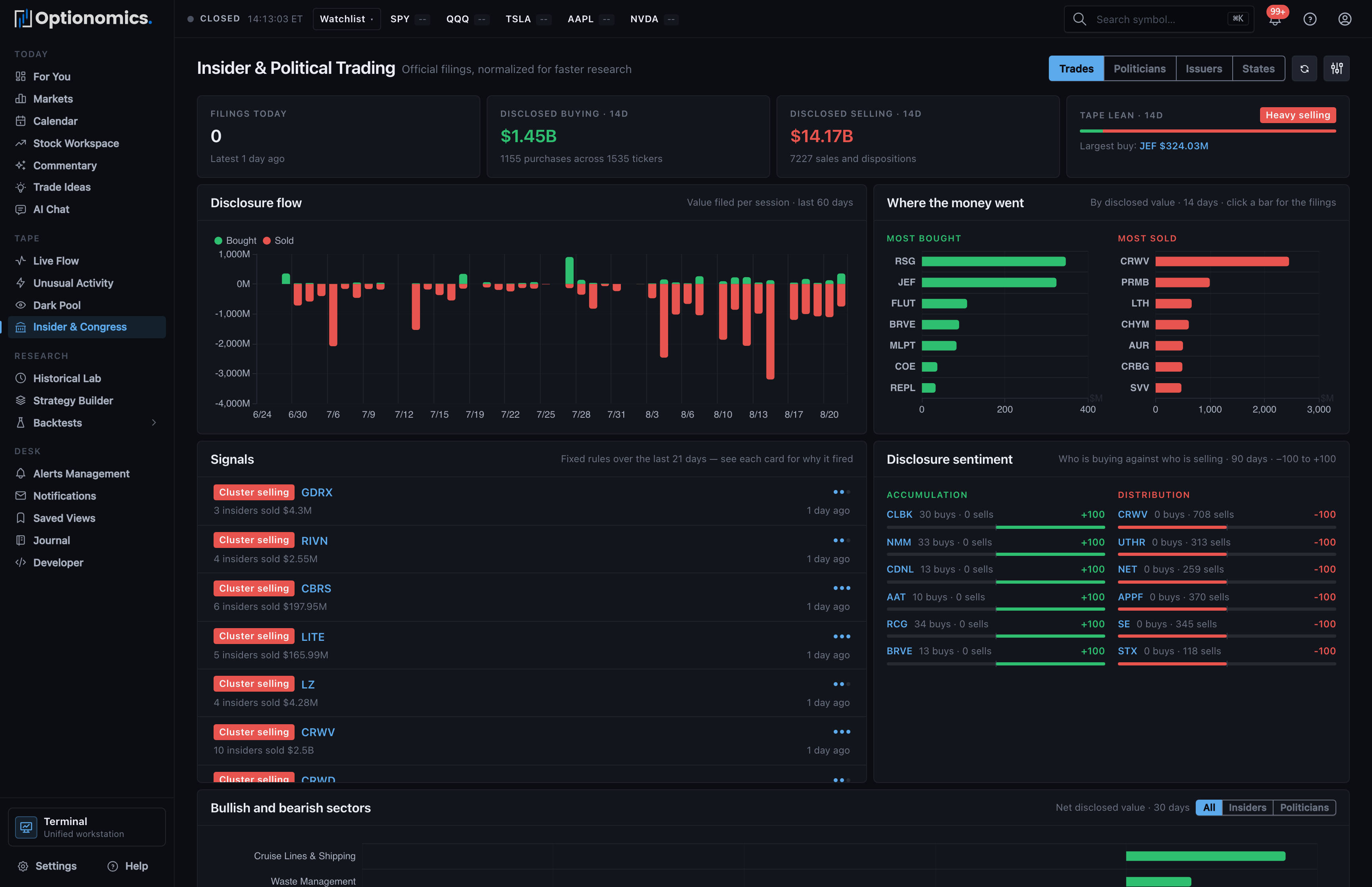
The Trades page opens with a dashboard above the tape:
- KPI band — filings today (and how fresh the latest is), disclosed buying and selling over the recent window, and a tape lean read (bullish/bearish/neutral) with the largest disclosed buy.
- Disclosure flow — the value filed per session over the recent weeks, so you can see when disclosure activity clustered.
- Where the money went — the most-bought and most-sold tickers by disclosed value; clicking a bar drills the tape to that name.
- Signals — rule-based setups the platform detected in recent filings (for example clustered buying), each with a direction badge, a strength meter, and a headline.
- Disclosure sentiment — an accumulation-versus-distribution board scoring tickers from −100 to +100 based on recent disclosed activity.
- Bullish and bearish sectors — net disclosed value by industry, with an All / Insiders / Politicians toggle.
The dashboard describes recent windows of official filings. It reacts to the Refresh button, not to the tape filters below it.
Filter the trade feed
The results card carries its own lens—All activity / Politicians / Insiders—plus a filter panel:
- Company, ticker, or person search
- Disclosure type (all, politicians, insiders)
- Official source: SEC Form 4, U.S. House PTR, U.S. Senate PTR, Executive branch OGE 278-T
- Political-report state, where applicable
- Transaction type: purchases, sales, awards, exercises, gifts, dispositions, conversions, expirations, other
- Filing period: last 30 days, 90 days, year, 3 years, or all history
- Estimated minimum value, from $1K+ to $1M+
- Sort order: newest disclosed, newest transaction, largest value, reporting person, or ticker
Feed columns: Filed, Transaction, Issuer / asset, Reporting person, Qty / price, Value, and Source, with a chevron into the filing’s detail page. A filing that reports several transactions renders as one grouped block, the way it was filed.
The filing detail page
Opening a row shows everything the filing reported, in context:
- Trade summary — the transaction type, the calculated value (or the reported value range, for political filings), the filer, the issuer, and three dates that matter: the transaction date, the public filing date, and the lag between them.
- Price context — a candlestick chart marking both the transaction date and the public filing date, with the closes around each and the return since the filing became public. The return is measured from the public filing date deliberately: that is the first day anyone outside could have acted on it.
- Source details — the raw reported fields (security, quantity, price, ownership form, transaction code) and a link to the original filing.
- Transactions in this filing — the filing’s other line items.
A Follow filer button creates a disclosure alert for that person, so their next public filing notifies you through your configured channels.
Politician, issuer, and state profiles
- Politicians (
/politicians) — a card directory of officials with trade counts, issuers, estimated value, last-trade date, and a buys/sales bar; filter by office (House, Senate, executive branch), state, and period. A profile page shows the official’s trades, a Track record card—win rate, average return, and performance versus SPY across their recent disclosed buys—their monthly activity cadence, top issuers, and recent source filings, plus a Follow bell. - Issuers (
/disclosures/issuers) — companies ranked by disclosed activity, with a source mix (political versus insider), a 90-day disclosure sentiment score, and price context. A profile page overlays disclosed trades on the price chart, lists the top reporting people, and links straight into the symbol’s Stock Workspace, Flow, and UOA. - States (
/states) — state-level political disclosure coverage: trades, politicians, issuers, and estimated value per state, with per-state profiles.
Per-stock disclosure tabs
Every Stock Workspace carries Insider and Congress tabs showing that symbol’s filings from the last year, with a summary strip (filings, filers, and—for insiders—bought, sold, and net value) and a table grouped by filing.
Interpret disclosures carefully
- A filing reports a transaction under the source’s disclosure rules; it does not explain the person’s full portfolio or motivation.
- Political disclosures can use value ranges rather than exact transaction values.
- Filing and transaction dates are different. Always check both—the lag is often weeks.
- Purchases, sales, grants, exercises, gifts, and other transaction types have different meanings.
- Track-record and sentiment figures summarize what happened after past filings; they are context, not a prediction for the next one.
Use this workspace as a research input and verify material details against the linked official source before relying on them.
