Real-Time Options Flow
The live options tape, filterable and replayable
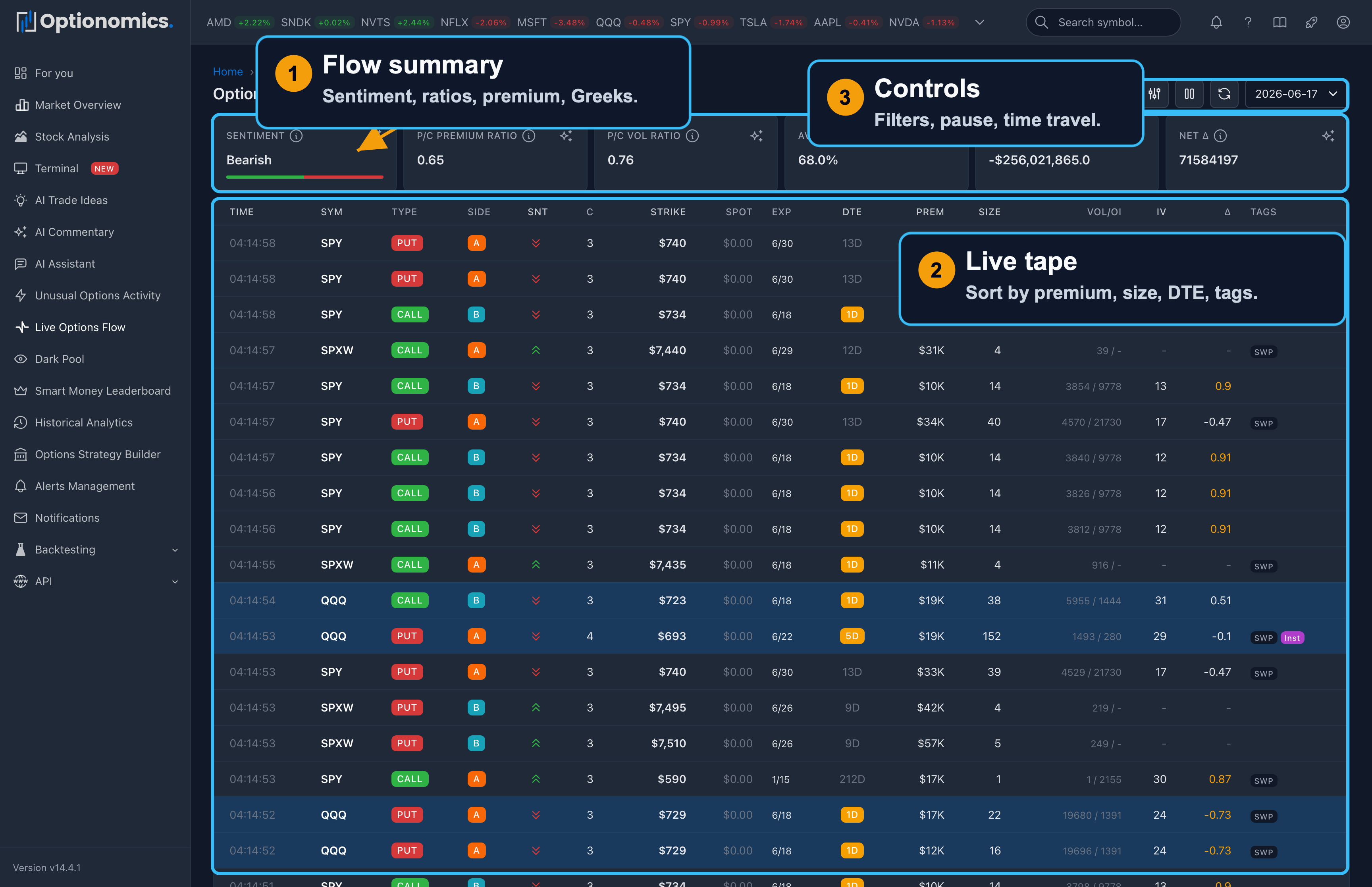
What live options flow is
Options flow is the live record of options prints: who is paying up for calls or puts, in what size, with what urgency, and at which strikes and expiries. Unlike equity tape alone, options flow encodes horizon (DTE), leverage, and often intent—though intent is inferred, never certain, from context such as volume versus open interest, execution side, and repetition.
Traders use flow to confirm or question a narrative. A chart move accompanied by repeated ask-side call activity reads differently from one without comparable option activity, but the tape still cannot prove whether those trades are opening, closing, directional, or hedged.
Who it is best for: Active intraday and swing traders, catalyst-driven names, and anyone building alerts off live prints.
Availability: Included with plans that carry live options flow—Gamma and higher.
Open it: Sidebar → Live Flow (also at /flow). A switcher in the page header moves between the three tape pages—Flow, UOA, and Dark pool—without losing your day.
The summary rule
One row of live stat tiles across the top summarizes the session (or your filtered slice of it):
| Tile | What it shows |
|---|---|
| Premium | Total premium that traded in scope |
| Prints | Number of prints |
| Calls / Puts | The split by side—each half is clickable to filter to that side |
| Paid up / Hit bid | Dollars that crossed at or above the ask versus at or below the bid—clickable |
| Net premium | Call premium minus put premium |
| Pace | How the current 10-minute slice compares with the session average |
| Avg IV | Average implied volatility across prints |
| Δ traded | Share-equivalent delta traded |
| Sentiment | The leading classified tone and its share of prints |
Any filters you set appear as removable chips under the tiles, with a Clear all link.
The session ribbon
Below the tiles, a compact session ribbon draws one bar per 10-minute slice—calls above the line, puts below—with a thin running net-premium line. The header names the busiest slice (e.g. “Busiest 10:00–10:10 · $12.3M across 842 prints”) and gives a verdict: Call-heavy, Put-heavy, or Balanced.
Drag across the ribbon to select a time window: every tile and the table below narrow to that window together. This is the fastest way to answer “what happened in the ten minutes around the news?”
The table: three grains
A switch above the table changes the level of aggregation:
- Prints — every individual trade, streaming live.
- Contracts — one row per contract, with print counts, size, premium, a paid-up/hit-bid split bar, and IV.
- Expiries — one row per expiration, with contract counts, premium, share of scope, calls/puts and paid-up/hit-bid splits.
Prints columns
| Column | What It Tells You |
|---|---|
| Time | When the trade executed |
| Sym | Stock ticker, with the day’s % change |
| Type | Call or Put |
| Side | Where the trade executed relative to the displayed bid and ask |
| Snt | Sentiment (bullish/bearish/neutral) |
| C | Confidence rating (1–5) |
| Strike | Option strike price |
| Spot | Current stock price |
| Exp | Expiration date |
| DTE | Days to expiration |
| Prem | Total premium ($) |
| Size | Number of contracts |
| Vol/OI | Volume vs open interest |
| IV | Implied volatility |
| Δ | Delta |
| Tags | SWP (sweep), BLK (block), ML (multi-leg), Opening, Inst(itutional) |
Execution side
The side badge summarizes where a print occurred relative to the quoted market. Ask-side and above-ask execution can indicate buyer urgency; bid-side and below-bid execution can indicate seller urgency; mid-market execution is less directional. Quote movement, multi-leg packages, and reporting timing can make a badge ambiguous, so use it as context rather than confirmed intent.
Trade tags
- Sweeps (SWP) — orders that sweep across multiple exchanges to get filled immediately. High urgency.
- Blocks (BLK) — large negotiated trades executed as single transactions. Size does not identify the participant or whether the trade is directional.
- Multi-leg (ML) — the print is part of a detected multi-leg package; read it with its siblings, not alone.
- Opening — the print’s size exceeded the contract’s prior open interest, so it cannot be purely closing.
Hover previews and the row menu
- Hover a row briefly and a small chart popover opens for that contract—its own price history—so you can scan the tape without a second click.
- Click (or right-click) a row for a context menu: focus the symbol or the contract, add or remove the symbol from a watchlist, Set Alert for the symbol, open the premium or exposure map, open a Flow Snapshot detail card for the print, view the symbol’s dashboard, or open the contract’s history chart.
Live stream controls
- Pause / Play stops the live stream so you can read a row without it scrolling away. While paused, a badge counts the prints you are missing; resuming reloads the table so there is no gap.
- The table streams live when you are viewing today’s session on the Prints grain, unsorted and unwindowed; sorting, paging, a time window, or a past date give you a stable snapshot instead.
- A date selector (Time Travel) replays any of the last 30 sessions.
- Refresh re-runs the current view on demand.
Saved Views: once you have a useful filter combination, save it as a named view from the bookmark control and reapply it later—from the same control, from /saved_views, or from the command palette.
Filters
The filter panel has three tabs plus one-click quick filters (Smart money, Whales, 0DTE, Near expiry, Institutional):
- Basic: trade type (Sweeps, Blocks, ISO, Smart Money), calls/puts, sentiment, symbol, execution side (Inside, Above Ask, At Ask, Mid, At Bid, Below Bid), confidence rating, and ranges for premium, strike, DTE, and size.
- Advanced: moneyness (ITM/OTM), spread %, minimum volume and open interest, and market-quality flags (wide spread, extended hours).
- Greeks: high-delta and high-gamma toggles with ranges, IV range, theta and vega minimums.
Reading Flow: Quick Guide
| Signal | Interpretation | Action |
|---|---|---|
| Large premium + Sweep + At Ask | Urgent call-side execution | Check whether the print is part of a spread or hedge |
| Block trade + Far OTM | Large negotiated risk transfer | Check news, open interest, and related legs |
| High volume relative to open interest | Activity is large compared with prior open positions | Review whether volume persists and open interest changes later |
| 0DTE activity | Very short-dated exposure | Expect fast sensitivity changes and verify the event calendar |
| Repeated trades at one strike | Concentrated interest at that contract | Compare timing, side, and related expirations |
| Sweep + Above ask | High execution urgency | Treat urgency as context, not proof of direction |
Important: Large trades can be:
- Opening new positions (bullish/bearish)
- Closing existing positions (profit-taking, loss-cutting)
- One leg of a spread (incomplete picture)
- Hedges for stock positions (opposite sentiment)
Always consider context: news, technicals, overall flow direction.
Terminal
For power users focused on day trading, the Terminal provides:
- A three-column layout: AI feeds on the left, chart and symbol research in the center, and Unusual Activity, Options Flow, Market Scanner, Watch List, or Alerts on the right
- Advanced charting with overlays (flow S/R, dark pool, GEX, chain walls, VWAP, net flow), drawing tools, and indicators
- A preset-based Market Scanner (unusual activity, bullish/bearish flow, whale trades, gamma squeeze, and more)
- The AI feeds in one place (Commentary and Ideas, available with Theta or Vega)
Next: Unusual Options Activity — the curated, scored view of the same tape.
Remember: Flow shows what traders are doing, not what will happen. Large trades can be hedges, spreads, or wrong. Use as one input in your analysis.
