Terminal
The unified workstation for active sessions
What the Terminal is
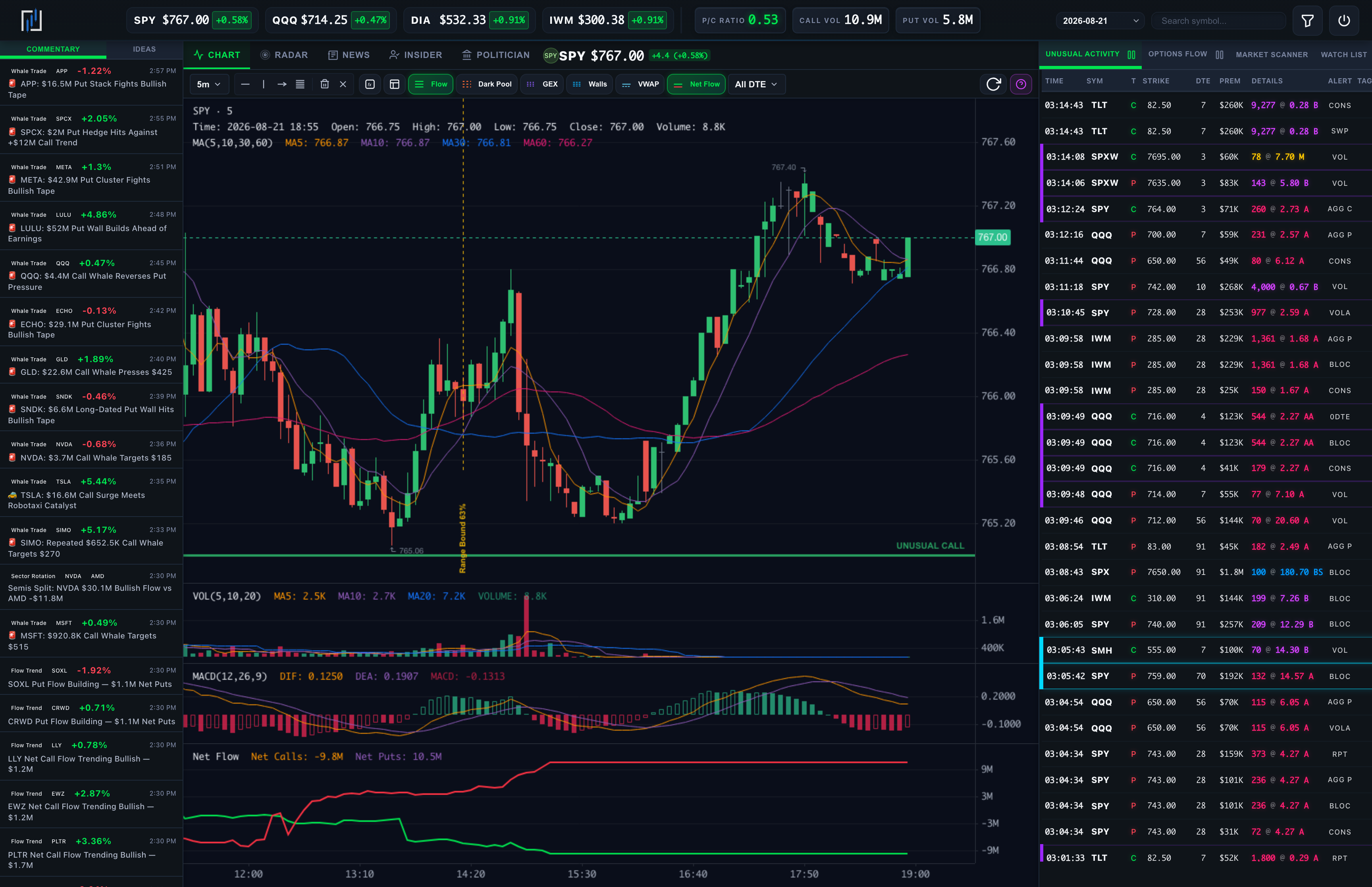
The Terminal is Optionomics’ multi-panel workspace: one dark, dense browser layout where you can keep a price chart, AI feeds, live flow, unusual prints, a scanner, your watch list, and alert notifications in sync around a single symbol.
It is built for traders who want tight feedback loops during the session: change the symbol once, and the chart, flow tables, and overlays follow. Even slower-tempo traders find it useful on earnings week or event days when context density matters.
Availability: The Terminal requires Gamma or higher. The Commentary and Ideas panels show their full content on Theta and Vega.
Open it: The Terminal launcher card at the foot of the sidebar (also at /terminal), or the Open in Pro Terminal button on any stock chart, which carries the symbol with it.
Layout
| Region | Purpose |
|---|---|
| Header | Index quote ticker, market gauges, a time-travel session selector, symbol search, and the flow filter |
| Left — AI | Tabs for the AI feeds: Commentary and Ideas |
| Center — symbol | The chart plus Radar, Earnings, News, Insider, and Politician tabs for the active symbol |
| Right — live | Switchable panel: Unusual Activity, Options Flow, Market Scanner, Watch List, or Alerts |
The market gauges read out the tape at a glance: put/call ratio, call and put volume, VIX, and the Optionomics Market Pulse tone. The header’s time travel selector replays a prior session across the whole workspace.
Left column — AI feeds
| Tab | Content |
|---|---|
| Commentary | The live Market Commentary feed |
| Ideas | The live Trade Ideas feed, with entry→target levels and a P/L hint |
Click any symbol in these panels to load the chart and re-anchor the entire workspace around that name. Live price-change badges appear next to symbols so you can read direction without hopping tabs, and hovering a row opens a detail popover.
Center column — chart and symbol context
- Symbol header with logo, live price, market cap, and a next-earnings badge (date, pre-market/after-hours, and the EPS estimate) when a report is near.
- Timeframes: 1m, 5m, 15m, 1H, 2H, 4H, D, W, M (5-minute default).
- Overlay toggles:
| Toggle | Overlay |
|---|---|
| Flow | Dynamic support/resistance from options flow (on by default) |
| Dark Pool | S/R from the last week of dark pool prints |
| GEX | Gamma-exposure key strikes |
| Walls | Chain-derived levels—call wall, put wall, max pain, key strikes |
| VWAP | Session VWAP and premium-weighted strike VWAP |
| Net Flow | Net calls versus net puts bought/sold lines (on by default), with a DTE filter: All DTE, 0 DTE, Weekly, Monthly, LEAPS |
- Drawing tools: horizontal, vertical, and ray lines plus Fibonacci, with remove-last and clear-all.
- Indicators modal: main-chart MA, EMA, SMA, BOLL, SAR, BBI; sub-chart MA, EMA, VOL, MACD, RSI, KDJ.
- Flow Heatmap modal: a strike-by-expiration grid for the current symbol, switchable between Net Flow, GEX, Vanna, Charm, Volume, OI, and Premium, with the at-the-money row highlighted.
- Center tabs: Chart, Radar (the same twelve-panel structural view as the Radar page), Earnings (the filing list with sentiment and key figures), News (headlines with sentiment), and Insider / Politician (the symbol’s disclosure filings).
An in-app help modal (“How to Read Options Flow”) documents the flow table columns, sentiment colors, badges, and border markings—open it from the chart toolbar at any time.
Right column — switchable live panel
| Tab | Content |
|---|---|
| Unusual Activity | Live unusual options activity prints, with Pause/Resume |
| Options Flow | The live options flow tape, with Pause/Resume |
| Market Scanner | Preset-based discovery (below) |
| Watch List | Your pinned watchlist with live % changes, an add box, and per-row remove |
| Alerts | Your delivered notifications, with an unread badge and a Manage Alerts link |
The tape rows carry sentiment coloring and compact badges—S (sweep), B (block), M (multi-leg)—and colored borders for size-versus-open-interest anomalies (all documented in the help modal). Hovering a row draws that contract’s own price chart in a popover.
Market Scanner presets
| Preset | What it looks for |
|---|---|
| Unusual Activity | Volume and open-interest anomalies with movement follow-through |
| Bullish Flow / Bearish Flow | One-sided options flow with follow-through |
| IV Extremes | Relative IV context—not a standalone entry signal |
| Gamma Squeeze | Short-horizon gamma setups |
| Whale Trades | Whale-sized prints |
| Institutional | Institutional-style flow |
| Vol Crush | Premium-selling setups when the signal score is high |
| Dark Pool Convergence | Options and dark-pool activity converging |
Each result carries an actionability note—Validated setup, Watchlist, or Research only—and a signal-strength bar. The scanner refreshes itself every minute during a live session.
Filters
The header’s filter modal shapes both live tape panels: option type (calls/puts), security type (stocks/ETFs), premium floor ($50K+ to $1M+), bid/ask execution flags, detail flags (sweeps only, blocks only, multi-leg, unusual only), and an expiration date range. Active filters render as removable chips above the tables.
The symbol, session date, and filters live in the URL, so a bookmarked terminal reopens the way you left it. Panel choices and overlay toggles reset to their defaults on a fresh load.
/terminal/flow and /terminal/alerts open the flow tape and the alerts feed as full-page versions of the same panels, at the same filters, when you want one feed on a whole monitor.
A typical intraday workflow
- Set the symbol from search, the watch list, or a row in the AI panels so all panels align.
- Glance at the market gauges and Commentary to read the broad tape.
- Scan Ideas for candidates that already have weight behind them.
- Turn on the chart overlays that match your plan (for example Flow S/R + Net Flow + GEX) to see whether price is interacting with where options activity clustered.
- Use Unusual Activity and Options Flow on the right for individual prints, or the Market Scanner for preset-based discovery.
- Use Alerts as a paper trail of what already fired for your rules.
You don’t need every tab every day; most traders live in chart + one AI tab + one right-panel tab.
Differences vs the standalone pages
The Terminal shares data with the standalone pages but adds:
- A single symbol context that ties chart and side panels together.
- A live right panel you can switch without losing the chart.
- Pause / Resume on the live streams.
- The Flow Heatmap and in-app help modals tuned to the terminal layout.
For deep, sortable, filterable lists (the session ribbon, grains, and full filter panels), open the full-page Unusual Activity and Options Flow pages from the sidebar.
Related: Options Flow · Trade Ideas · Market Commentary · Alerts Management · Notifications
Note: The Terminal displays real-time data for informational purposes. Options trading involves substantial risk.
